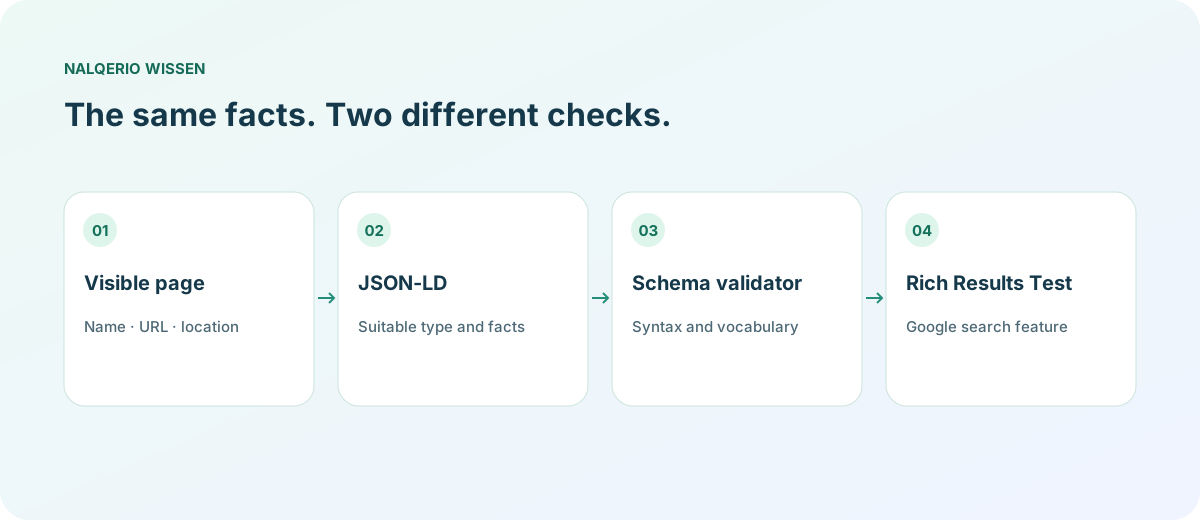
Choose a suitable Schema.org type and mark up accurate information only. Keep visible facts and JSON-LD consistent. Check syntax and vocabulary first, then the requirements of a specific search feature. Valid markup guarantees neither a rich result nor an AI mention.
What is schema markup, and where does JSON-LD fit?
Schema.org provides vocabulary for describing things such as businesses, articles and products. Organization is a type for an organisation; properties such as name and url describe particular facts about it.
JSON-LD is one way to express structured data. It is commonly included in a script element with the type application/ld+json. It is not a visible advertising space or a JavaScript program visitors need to run.
Google’s introduction to structured data explains how search systems may use these descriptions. The visible page remains essential: markup cannot make a nonexistent offer real. Search Central states that Google’s AI features do not require special AI schema.
For a WordPress site, the practical WordPress guide covers the content review before adding more extensions.
Organization or LocalBusiness: Which type fits?
Start with the subject of the page. A company overview describes the organisation. A page for a particular repair shop with an address and opening hours describes a local business. Choose a type for its meaning, rather than for a hoped-for search appearance.
| Your page | Possible type | Check |
|---|---|---|
| A software company introduces itself | Organization | Consistent name, official URL and actual logo |
| A local bicycle repair shop lists its address and hours | LocalBusiness or an appropriate subtype | A real location matching the visible location page |
| A knowledge article explains a specialist topic | Article for the article; organisation as publisher | Describe the article and the business as separate things |
In Schema.org, LocalBusiness is a more specific kind of organisation. A digital-only product does not need an invented storefront address. Google provides separate guidance for Organization and LocalBusiness.
A small Organization example
This example is fictional. Replace the name, domain and logo with your actual public information. The reserved example domain is not intended to be published unchanged on your website.
{
  "@context": "https://schema.org",
  "@type": "Organization",
  "@id": "https://example.com/#organization",
  "name": "BeispielWerk",
  "url": "https://example.com/",
  "logo": "https://example.com/assets/logo.png"
}
@id provides a stable identifier for the described business. Reuse it when other data on your website refers to that organisation. Before adding the example, check whether your CMS or SEO plugin already creates an Organization object. Update the existing output rather than introducing contradictory parallel objects.
sameAs can identify external profiles that actually belong to the organisation. Do not populate it with search results, unrelated industry articles or other brands. The Schema.org type reference describes additional properties; a particular Google feature will not necessarily use all of them.
For individual store products, the Product schema guide provides a dedicated JSON-LD example. Establish the underlying company facts first with entity SEO.
A LocalBusiness example with a real location model
This example is also fictional and deliberately small. It illustrates an address structure, not a complete submission for a Google search feature. Publication requires your actual location data and the requirements of the relevant subtype.
{
  "@context": "https://schema.org",
  "@type": "LocalBusiness",
  "@id": "https://example.com/#location",
  "name": "BeispielWerk Fahrradservice",
  "url": "https://example.com/werkstatt",
  "address": {
    "@type": "PostalAddress",
    "streetAddress": "Musterstraße 12",
    "addressLocality": "Musterstadt",
    "postalCode": "12345",
    "addressCountry": "DE"
  }
}
Compare the address and spelling with the visible contact or location page. Add opening hours only when they are current. For multiple distinct locations, keep their identities clear so that one identifier does not describe contradictory addresses.
Local schema is not a substitute for a maintained business profile or an understandable location page. Do not add ratings, prices or awards without the underlying facts and compliance with the rules of the particular search feature.
Check structured data before and after publication
- Inspect the current output: Look at the delivered HTML to find JSON-LD objects already generated by your CMS.
- Check syntax and vocabulary: Use the Schema Markup Validator to inspect Schema.org structure and possible errors.
- Check the search feature: The Google Rich Results Test covers supported Google features. A valid Schema.org type need not appear there as its own rich result.
- Compare with the page: Do the name, URL, address and logo match the visible information?
- Test the published URL: Check the actual output after saving and monitor later Search Console feedback where available.
A syntax error is different from a missing property required by a particular search feature. Fix the finding rather than adding fields indiscriminately. For the wider technical review, follow the GEO audit guide.
Maintain the facts and observe outcomes separately
When a name, logo or location changes, update the visible page and structured data together. Link to the responsible company or contact page from relevant parts of your website. The GEO optimisation guide shows how to turn an information gap into a specific edit.
Nalqerio is not a replacement for a schema validator and does not promise automatic JSON-LD generation. It provides a separate view of stored AI answers and evidence. The website review product tour and methodology explain the scope.
You can then try Nalqerio free to inspect a starting point for your brand. A single before-and-after difference cannot reliably establish whether markup caused a later answer to change.
Technical annotation describes your content. To assess whether the statement itself is verifiable, use the E-E-A-T checklist for product claims and evidence.
Frequently asked questions
Does schema markup automatically improve rankings?
No. It describes content in a machine-readable form and may support eligible search features. It guarantees neither a better ranking, a special appearance nor an AI mention.
Why does the Rich Results Test not show my Organization markup as a rich result?
The test covers supported Google search features rather than every Schema.org type and property. Also check the vocabulary with the Schema Markup Validator and consult the current Google guidance.
Do I need special schema for ChatGPT or Google AI answers?
Google does not list special Schema.org markup as a prerequisite for its AI features. Use factually appropriate structured data while maintaining access and understandable content.
Sources and further reading
- Google: Introduction to structured data
- Google: Organization
- Google: LocalBusiness
- Schema.org: Organization
- Schema Markup Validator
- Google: Rich Results Test
- Google: AI features and your website
Methods, product scope and sources reflect the publication date shown. Examples are not measurements of your website. Linked product pages provide current plan and provider details.
