Describe the specific product with Product and the real offer with Offer. Price, currency, availability and variant must match the visible page. Test syntax separately from Google requirements; valid markup does not guarantee rich results or recommendations in AI search.
Product schema, product snippets and merchant listings
Product is a Schema.org type describing a specific product. Offer describes an associated offer, including details such as price and availability. Markup supplements the readable page; it does not replace a product description or your checkout.
Google distinguishes product snippets from merchant listings, with different requirements. Choose the relevant documentation for the page: can someone buy the product there, or is it an editorial review? The Google product documentation explains the available paths.
This article focuses on individual store product pages. Company identity belongs in the broader Organization or LocalBusiness markup guide. A category showing twenty offers is a different implementation problem from a detail page for one workshop box.
A fictional Product schema JSON-LD example
Imagine a store selling an empty metal workshop box for €39.90. Its product page displays the name, image, description, SKU, price and availability. The following is a learning example; shop.example is not an actual store. Adapt the product text to the language and facts of your real page.
{
  "@context": "https://schema.org",
  "@type": "Product",
  "@id": "https://shop.example/produkte/werkstattbox#product",
  "name": "Workshop box S",
  "description": "Empty metal box with a removable divider.",
  "image": "https://shop.example/bilder/werkstattbox-s.jpg",
  "sku": "WB-S-01",
  "brand": {
    "@type": "Brand",
    "name": "BeispielWerk"
  },
  "offers": {
    "@type": "Offer",
    "url": "https://shop.example/produkte/werkstattbox",
    "price": "39.90",
    "priceCurrency": "EUR",
    "availability": "https://schema.org/InStock"
  }
}
In a real implementation, the adapted JSON goes inside a script element with type application/ld+json. Replace every example URL, identifier and price. The image must show the described product and be accessible at the specified address.
There are deliberately no star ratings in this example. Never manufacture reviews to clear a warning. It also does not implement every possible shipping, return or variant requirement. Add only accurate information relevant to the intended search feature and actual offer.
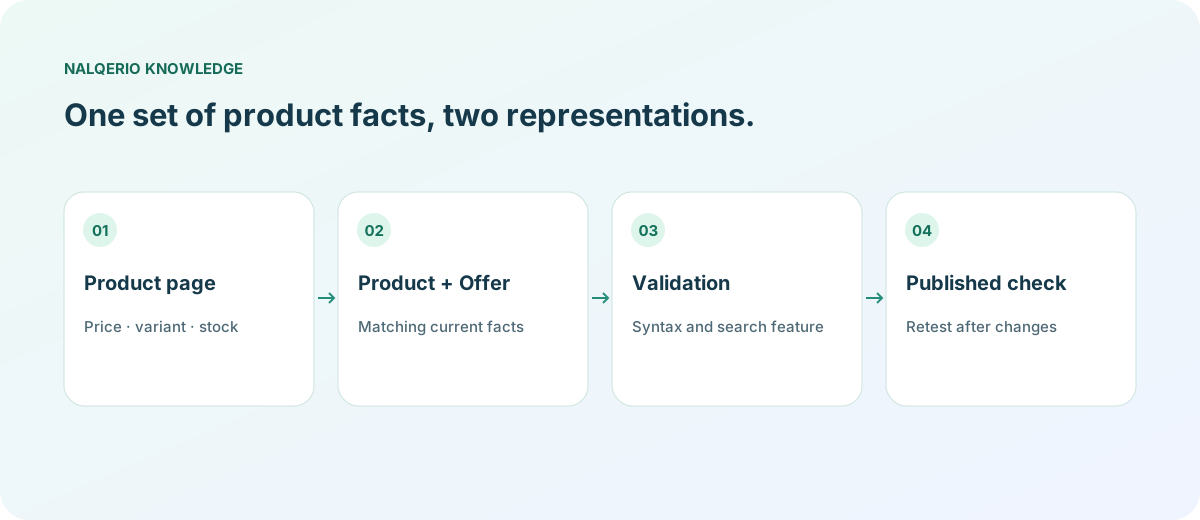
Reconcile price, currency and availability
Treat markup as a second representation of the same product page. Where possible, use the same underlying product data for the visible price and JSON-LD. A manually maintained block can become outdated at the next price change. Numeric decimals use a point, while currency is provided separately, such as EUR.
| Visible fact | Matching data | Common discrepancy |
|---|---|---|
| €39.90 | offers.price = 39.90, priceCurrency = EUR | An old sale price remains in markup |
| In stock | offers.availability = https://schema.org/InStock | The page and code disagree |
| Workshop box S | name and sku | The block describes the larger variant |
| Image of an empty box | image | Included accessories are misrepresented |
Do not assume that “can be ordered” always means “in stock”. Choose the status that reflects back orders or pre-orders when relevant. A syntactically valid value can still be factually wrong. For broader website checks, continue with the GEO audit workflow.
Shopify, WooCommerce and product variants
Inspect the markup your store already publishes. A theme, SEO extension and product application may each generate blocks. Do not add another Product object before identifying the component that owns current price and stock data. Installing a plugin does not replace this investigation.
Next, select a variant such as the larger box. Do the URL, image, SKU and price change consistently? Record what an initial page request shows before a visitor makes a selection. Google's product variant documentation covers approaches including ProductGroup; a single-product example is not a complete variant-catalog implementation.
For multilingual stores, the description should fit the page language and selected product. Check that separate language pages do not accidentally publish an unrelated default variant. Link category content to the appropriate detail page instead of making near-identical articles for every word order of a product keyword.
Test Product schema in two different ways
The Schema.org validator helps check syntax and vocabulary. The Google Rich Results Test checks supported Google features. Passing a test is not a promise that a rich result will appear.
After implementation, test the published URL rather than only your prepared code. Separate errors from warnings. Google's product snippet instructions explain required properties. Then inspect the visible page again: is the price correct, and does the product link work?
A meaningful maintenance test is a planned stock change in your own test environment. Observe whether the visible status and JSON-LD update together. That checks the data pipeline, rather than producing a one-time green result for a product that later becomes outdated.
From consistent data to useful customer questions
Product schema is not a ChatGPT product feed. The ChatGPT shopping guide for merchants explains that separate data path. A valid Product block alone does not guarantee acceptance or placement there.
Nalqerio does not generate store markup. It documents API answers to questions about your brand and offers. The website audit tour and methodology show the actual scope. The free trial provides a limited baseline; measure real orders in your store's own system as well.
Frequently asked questions
Is Product schema enough for Google Shopping?
Not automatically. Google describes different product experiences and additional paths such as Merchant Center. Check the requirements for your specific case; markup alone does not promise display.
Can I add invented reviews to pass the test?
No. Only mark up accurate, policy-compliant content. A warning does not justify fabricated reviews or stock information.
Is Product schema a ChatGPT shopping feed?
No. Website JSON-LD and a product feed sent to a provider are separate data paths. They should nevertheless describe the same current product facts.
Sources and further reading
Methods, product scope and sources reflect the publication date shown. Examples are not measurements of your website. Linked product pages provide current plan and provider details.
