ChatGPT Atlas was an AI browser from OpenAI, released only for macOS and shut down on 9 August 2026. Its features live on in ChatGPT and Codex, while other providers such as Perplexity with Comet still bet on their own browsers. For websites this means AI agents read, compare and fill in forms. Clearly structured pages, unambiguous prices and accessible forms prepare you for these visitors.
What was ChatGPT Atlas?
ChatGPT Atlas was a web browser from OpenAI, launched on 21 October 2025. Technically it was built on Chromium, the same foundation as Google Chrome. What made it special was ChatGPT, built into every page:
- Sidebar: ask questions about the page you have open, summarise text, compare products.
- Agent mode: on paid plans, ChatGPT could click, scroll and fill in forms itself, for example to search for a hotel or fill a shopping cart.
- Browser memories: if you allowed it, ChatGPT remembered content from pages you visited to use later.
Atlas was released only for macOS. Versions for Windows, iOS and Android were announced but never arrived. Anyone searching for a “ChatGPT Atlas Windows download” today will not find an official file, and unofficial offers should not be trusted.
Why Atlas was shut down
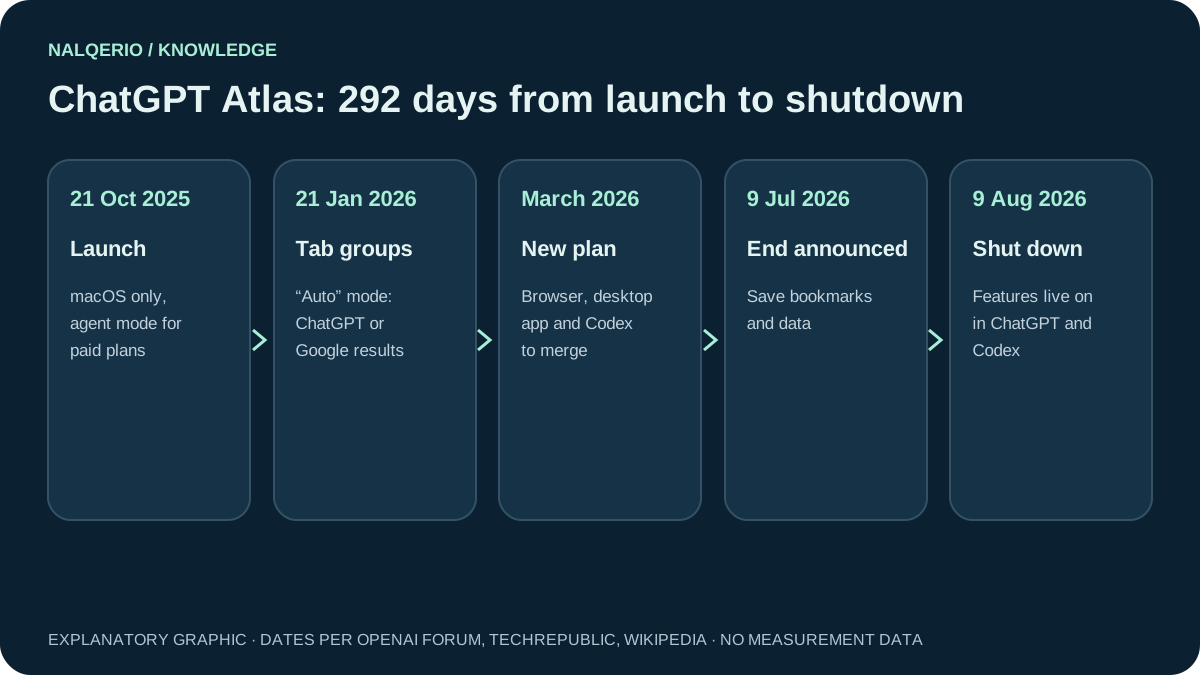
In March 2026 OpenAI announced plans to merge Atlas, the ChatGPT desktop app and Codex into one application. On 9 July 2026 it announced that Atlas would be discontinued, and on 9 August 2026 the browser was switched off. Users were advised to save bookmarks and important data beforehand. ChatGPT chat history was not affected, because it is stored separately.
Reports point mainly to one lesson: people do not like switching browsers. Instead of moving users to a new program, OpenAI brings agent features to where people already work, in ChatGPT and Codex.

ChatGPT Atlas alternatives: AI browsers at a glance
The idea of an AI browser did not disappear with Atlas. If you want similar features, you have several options:
| Option | What it is | Good to know |
|---|---|---|
| Perplexity Comet | dedicated AI browser with an assistant on every page | free for everyone since 2 October 2025, reportedly for Windows, macOS and iOS |
| ChatGPT and Codex | OpenAI’s agent features without a separate browser | successor to the Atlas features |
| Microsoft Edge with Copilot | AI features in a familiar browser | no need to switch browsers |
| Google Chrome with Gemini | Gemini as an assistant in the browser | scope depends on country and plan |
Before choosing, check what data the assistant sees and where it is stored. A browser that reads pages for you also reads your inbox and online banking if you use it there.
What AI browsers do on your website
For businesses, which browser wins matters less than what these programs do on websites. An AI agent in the browser:
- reads your page like a person, only faster, and summarises it for the user;
- compares your offer with other pages it opens at the same time;
- acts when the user allows it: filling in forms, requesting appointments, adding products to the cart.
In your analytics these visits often look like normal Chrome visits, because the browsers are based on Chromium. They cannot be filtered out cleanly. What you can measure are visits referred from ChatGPT, Perplexity or Gemini. Our guide to measuring AI traffic shows how to do this in GA4.
Question: Can I block AI browsers?
Only to a limited extent. Agents browsing on behalf of a user behave like browsers. Individual bots from AI companies can be controlled via robots.txt, see AI crawlers.
Question: Should I block them at all?
Usually not. An agent checking your offer for a customer is a potential order. Blocking it means dropping out of the comparison.
Question: Can agents handle captchas?
Many agents hand captchas back to the person. Unnecessary hurdles therefore also cost you enquiries that come through an agent.
Question: Do I need a special agent version of my site?
No. A well-structured, accessible page works for people, search engines and agents alike.
How to prepare your website for AI agents
The good news: what helps AI agents also helps people using screen readers, search engines and customers in a hurry. These points have the biggest effect:
- Key details as text. Prices, services, opening hours and delivery terms belong in readable text, not only in images or PDFs.
- Clear labels. Form fields with clear labels, buttons with meaningful names such as “Request appointment” instead of “Next”.
- Few hurdles. No forced sign-up for simple enquiries, captchas only where really needed.
- Structured data. Product schema for shops, Organization and LocalBusiness for service providers, see schema markup.
- Consistent details. What your website says must match your business profile, directories and price lists. Agents compare sources.
AI browsers and your visibility in AI answers
An AI agent usually visits only the pages that an AI search recommended beforehand. Before someone checks your website in agent mode, they often ask ChatGPT, Perplexity or Google for suitable providers. If you are not named there, you never reach the browser.
That is why the answers themselves are worth watching: are you named for typical customer questions, and who appears instead? The free AI check tests this for ChatGPT in about a minute. For regular measurement across ChatGPT, Gemini, Perplexity and Google AI Overview, you can try Nalqerio free for 14 days.
Frequently asked questions
Does ChatGPT Atlas still exist?
No. OpenAI announced the end of Atlas on 9 July 2026 and switched it off on 9 August 2026. The agent features have moved into ChatGPT and Codex.
Can I download ChatGPT Atlas for Windows?
No. Atlas was only released for macOS, and a Windows version was never published. Offers of a Windows download do not come from OpenAI.
How much did ChatGPT Atlas cost?
The browser itself was free. Agent mode, which let ChatGPT click and fill in forms on its own, was reserved for paid plans.
What are the alternatives to ChatGPT Atlas?
Perplexity Comet is a dedicated AI browser and has been free since October 2025. There are also AI features in familiar browsers, such as Copilot in Microsoft Edge and Gemini in Google Chrome, plus the agent features directly in ChatGPT.
What do AI browsers mean for my website?
AI agents read, compare and fill in forms. Clear text, unambiguous form labels, few hurdles and consistent details help them and your human visitors alike.
Sources and further reading
- Wikipedia: ChatGPT Atlas
- OpenAI Developer Community: Atlas is scheduled to stop working on August 9, 2026
- TechRepublic: ChatGPT Atlas shuts down Aug. 9
- Engadget: Perplexity’s Comet AI browser is now free for everyone
- Nalqerio: free AI check
Methods, product scope and sources reflect the publication date shown. Examples are not measurements of your website. Linked product pages provide current plan and provider details.
